
ERP Finance Module: Features and Capabilities
A ERP finance module manages a company's financial transactions, reporting, and controls within a cloud-hosted ERP system. It handles the general ledger, accounts payable, accounts receivable, and financial reporting from one centralized platform.
Cloud delivery syncs this platform with live data instead of scheduled batches. Bank feeds pull transaction data into the ledger in real time, and reconciliation runs against that same live data as it arrives, rather than at fixed intervals. This real-time foundation extends to approvals and consolidation: finance teams authorize payments remotely from any location, and multi-entity businesses see consolidated financials update continuously instead of waiting for month-end processing.
What Is a ERP Finance Module?
An ERP finance module is the component of an ERP system that manages financial transactions, reporting, and controls. It processes the general ledger, accounts payable, accounts receivable, and financial statements within one shared database.
The module connects directly to every other module in the ERP suite. A sale recorded in the CRM module posts as revenue in the finance module automatically, without a separate data transfer step.
How eRP Delivery Changes the Finance Module
Delivery through the Erp changes the finance module in four ways: bank feed syncing, reconciliation, approval workflows, and multi-entity consolidation.
Bank feeds sync in real time, pulling transaction data into the ledger as it happens rather than through scheduled imports. Reconciliation runs against this same live data automatically, matching bank records to internal entries without manual review. This real-time processing extends to approvals and consolidation: finance staff authorize payments remotely from any location, and multi-entity businesses see consolidated financials update continuously instead of waiting for month-end batch processing.
Core Features of the ERP Finance Module
The ERP finance module includes ten core features, each managing a distinct part of a company's financial operations.
General Ledger
The general ledger records every financial transaction across the business in one central account structure. It organizes entries by account type, tracks debits and credits, and generates trial balances automatically. The ledger updates in real time as transactions post from accounts payable, accounts receivable, and other connected modules. Finance teams use it as the single source of truth for all financial reporting.
Accounts Payable
Accounts payable manages money the business owes to vendors and suppliers. It processes incoming invoices, matches them against purchase orders and receipts, and schedules payments based on agreed terms. The module flags discrepancies between invoiced and ordered amounts before payment releases. Finance teams use it to avoid duplicate payments and capture early-payment discounts.
Accounts Receivable
Accounts receivable manages money customers owe the business. It generates invoices, tracks payment due dates, and applies incoming payments against open balances. The module flags overdue accounts and calculates aging reports by customer. Finance teams use it to reduce days sales outstanding and improve collection timing.
Cash Management
Cash management tracks the business's cash position across all accounts and entities. It monitors bank balances, forecasts cash flow based on scheduled payables and receivables, and flags shortfalls before they occur. The module reconciles bank transactions against internal records continuously. Finance teams use it to maintain liquidity and plan short-term funding needs.
Financial Planning and Analysis
Financial planning and analysis builds budgets, forecasts, and variance reports from live financial data. It compares actual spending against budgeted amounts by department, project, or account. The module models multiple forecast scenarios based on different revenue or cost assumptions. Finance teams use it to guide spending decisions before variances become critical.
Multi-Currency Management
Multi-currency management processes transactions in multiple currencies within one set of books. It converts foreign currency transactions using current exchange rates and revalues open balances as rates change. The module generates consolidated reports in a single reporting currency across all entities. Finance teams use it to operate across regions without maintaining separate currency systems.
Tax Management
Tax management calculates and applies tax rules across jurisdictions where the business operates. It determines applicable tax rates by transaction type and location, then applies them automatically during invoicing and payment processing. The module generates tax reports formatted for filing requirements in each jurisdiction. Finance teams use it to reduce manual tax calculation errors.
Risk Management and Compliance
Risk management and compliance enforces internal controls and monitors transactions for irregularities. It applies approval thresholds based on transaction size, restricts access by user role, and logs every change for audit purposes. The module flags transactions that fall outside normal patterns for review. Finance teams use it to reduce fraud risk and maintain audit readiness.
Asset Management
Asset management tracks fixed assets from acquisition through disposal. It calculates depreciation schedules based on asset type and useful life, tracks asset location and condition, and records disposal or write-off transactions. The module updates the general ledger automatically as depreciation posts each period. Finance teams use it to maintain accurate asset valuations on the balance sheet.
Financial Reporting and Analytics
Financial reporting and analytics turns transaction data from every feature above into structured reports. It generates income statements, balance sheets, and cash flow statements on demand. The module builds custom dashboards for metrics like gross margin, burn rate, or accounts receivable turnover. Finance teams use it to review financial performance without compiling reports manually.
Primary Benefits of the ERP Finance Module
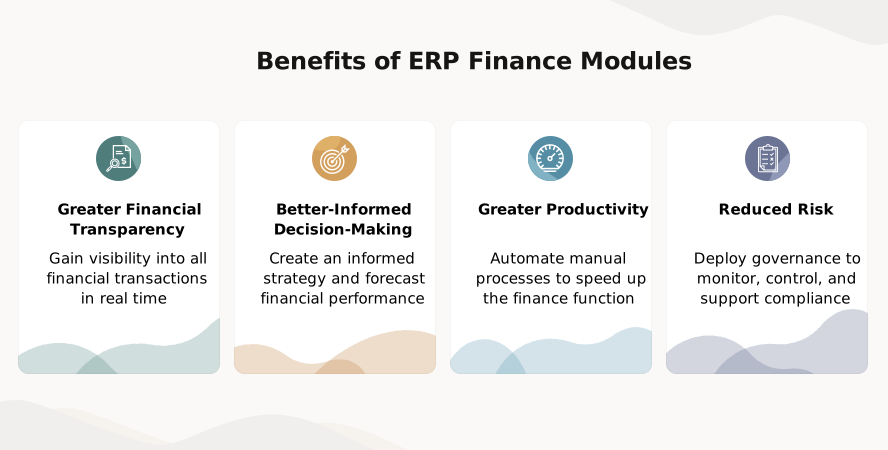
The ERP finance module delivers four primary benefits: faster financial close, fewer reconciliation errors, real-time cash visibility, and reduced compliance risk.
- Faster financial close : Automated posting from every connected module removes the manual data entry that delays month-end close.
- Fewer reconciliation errors : Continuous bank matching removes the lag between transaction and review, catching discrepancies as they occur instead of at month-end.
- Real-time cash visibility : Live cash updates remove the staleness of reports refreshed manually on a fixed schedule.
- Reduced compliance risk : Automated approval thresholds and audit logs remove the inconsistency of controls enforced manually by different staff.
Processes Managed by the ERP Finance Module
The ERP finance module manages five core financial processes: month-end close, invoice-to-payment, order-to-cash, budget-to-actual tracking, and audit preparation.
Month-end close pulls final transaction data from every connected module and posts it to the general ledger automatically. Finance teams previously closed the books manually, exporting data from separate systems and reconciling discrepancies by hand.
The invoice-to-payment cycle automates the accounts payable workflow from invoice receipt to payment release. The module matches invoices against purchase orders and routes approvals digitally, replacing the manual invoice matching and paper-based sign-off process finance teams used before.
The order-to-cash cycle automates the accounts receivable workflow from invoice generation to payment collection. The module tracks aging balances and flags overdue accounts automatically, replacing the manual spreadsheet tracking finance teams relied on to monitor customer payments.
Budget-to-actual variance tracking compares real-time spending against budgeted amounts as transactions post. Finance teams previously ran this comparison at fixed intervals, using exported reports that were already outdated by the time they finished the analysis.
Audit preparation compiles transaction records, approval logs, and compliance reports automatically from data already captured across the module. Finance teams previously assembled this documentation manually, pulling records from multiple systems each time an audit occurred.
ERP Finance Module in Practice: A Sample Workflow
An invoice enters accounts payable when a vendor submits it for a delivered order. Accounts payable matches the invoice against the original purchase order and the warehouse receipt, checking that quantities and pricing agree across all three documents before the match clears.
A cleared match routes the invoice to an approver based on its dollar amount. The approver authorizes payment from wherever they're working, since approval requires system access rather than a physical office. That authorization triggers two things at once: payment schedules for release, and the transaction posts to the general ledger.
The general ledger posting updates cash reporting the same moment it happens. Finance teams see the pending payment in their cash position before the payment date arrives, not after, because the ledger and cash reporting draw from the same live entry rather than a separate update cycle.
How the Finance Module Connects to Other ERP Modules
The finance module connects to inventory, procurement, and CRM through the same shared database that links every module in the ERP suite. Data flows between these modules automatically, without manual entry or separate file transfers.
Inventory transactions post directly to the finance module as they occur. A sale that reduces stock in the inventory module simultaneously records revenue and cost of goods sold in the general ledger, matching the real-time posting behavior established in the general ledger section above.
Procurement transactions follow the same pattern. A purchase order approved in procurement creates a corresponding liability in accounts payable, which then matches against the invoice and receipt once goods arrive, using the exact three-way match process described in the accounts payable section.
CRM transactions complete the cycle. A deal closed in CRM generates an invoice in accounts receivable, and payment against that invoice updates the customer's balance and the company's cash position at the same time.
Who Needs a Full Finance Module vs. Basic Accounting Software
A business needs a full ERP finance module once its operations span multiple departments, entities, or currencies that basic accounting software can't connect. Accounting software tracks financial transactions in isolation, recording income and expenses without linking to inventory, procurement, or sales data.
An ERP finance module shares one database with every other business function. A manufacturer needs it to tie production costs directly to financial reporting; a multi-entity company needs it to consolidate financials across subsidiaries without manual exports; a business managing multiple currencies needs it to convert and reconcile transactions automatically.
Basic accounting software suits single-entity businesses with straightforward transactions and no cross-departmental data needs. A small service business with one location and one currency often meets its financial reporting needs without the added complexity of a full finance module.
Frequently Asked Questions
What's the difference between an ERP finance module and accounting software?
An ERP finance module connects to inventory, procurement, and sales data on one shared database, while accounting software tracks financial transactions in isolation. Accounting software suits single-entity businesses; an ERP finance module suits businesses needing cross-departmental data.
Does the ERP finance module support multi-entity consolidation?
Yes, the ERP finance module supports multi-entity consolidation. It combines financials across subsidiaries into one consolidated report automatically, without manual exports or spreadsheet-based combination.
Can the finance module integrate with existing bank accounts?
Yes, the finance module integrates with existing bank accounts. It pulls transaction data directly from connected bank feeds and matches it against internal records for reconciliation.
How does the finance module handle multi-currency transactions?
The finance module handles multi-currency transactions by converting foreign currency entries using current exchange rates. It revalues open balances as rates change and consolidates reports in a single reporting currency.
Is the ERP finance module compliant with GAAP reporting standards?
Yes, the ERP finance module supports GAAP-compliant reporting. It generates financial statements formatted to GAAP standards, including income statements, balance sheets, and cash flow statements.
Ready to See Your Finance Module in Action?
Every finance team runs different processes across payables, receivables, and reporting. ERP for Private Equity helps you map which finance module features your portfolio companies need, see how multi-entity consolidation works for your structure, and get a clear path to implementation.